A single video can only do so much. Once it ends, viewers leave unless something pulls them into the next one. That's the gap playlists fill. Queue a series of related videos, let viewers move between them with one click, auto-advance when one finishes, and watch your average watch time go up without any new content.
Building this from scratch usually means a custom queue manager, a thumbnail strip with hover states, a "next up" preview, an auto-advance timer with cancel logic, and analytics on top of all of it. ImageKit's Video Player SDK ships every piece as a single object.
In this tutorial we'll build a workout series page for a fictional fitness coach. By the end the player will queue five workout videos, auto-advance between workouts with a configurable delay, and preview the upcoming workout 10 seconds before the current one ends. We'll also cover recommendations — suggested videos shown at the end of the series when you'd rather let viewers choose their next move than auto-advance (the two are mutually exclusive, as we'll see).
What we'll cover:
- Install and configure the ImageKit Video Player SDK
- Render a basic player
- Switch from a single video to a playlist
- Configure auto-advance, upcoming previews, and widget layout
- Add per-video metadata for the playlist widget
- Surface recommendations at the end of the series
Prerequisites: a Next.js 15+ project and an ImageKit account.
The full demo for this tutorial is on GitHub at imagekit-samples/playlist-demo.
Setting up the ImageKit Video Player SDK
Install the package in a Next.js 15+ / React 18+ project:
npm install @imagekit/video-playerAdd your ImageKit ID to .env.local:
NEXT_PUBLIC_IMAGEKIT_ID=ikmediaThe samples below use ikmedia, ImageKit's public sample account, so they run with zero setup. Swap in your own ImageKit ID to use your videos: you'll find it in the dashboard under Developer options. It's the path segment after ik.imagekit.io/.
The Player SDK uses browser APIs, so any component that renders it needs "use client" in the App Router. Here's a minimal player to confirm the install works:
"use client";

import { IKVideoPlayer } from "@imagekit/video-player/react";
import "@imagekit/video-player/styles.css";

const ikOptions = {
  imagekitId: process.env.NEXT_PUBLIC_IMAGEKIT_ID!,
};

const source = {
  src: "https://ik.imagekit.io/ikmedia/sample-video.mp4",
};

export default function SeriesPlayer() {
  return <IKVideoPlayer ikOptions={ikOptions} source={source} />;
}
Drop this into a page and you should see a working player with default controls. Once that's confirmed, we'll swap the single source for a playlist.
Switching from a single video to a playlist
Playlists live on a separate playlist prop, parallel to source. The shape is straightforward: an array of sources and an options object that controls playlist-wide behavior.
Start by defining the playlist data in a separate file. Keeping it out of the player component makes the player easier to scan.
// lib/workouts.ts
export const WORKOUTS = [
  {
    src: "https://ik.imagekit.io/ikmedia/example_images/playlist-demo/day1.mp4",
    info: {
      title: "Day 1 — Mobility warm-up",
      description: "10 minutes of dynamic stretching to loosen up.",
    },
  },
  {
    src: "https://ik.imagekit.io/ikmedia/example_images/playlist-demo/day2.mp4",
    info: {
      title: "Day 2 — Core stability",
      description: "Six core exercises, two rounds. No equipment.",
    },
  },
  {
    src: "https://ik.imagekit.io/ikmedia/example_images/playlist-demo/day3.mp4",
    info: {
      title: "Day 3 — Lower body strength",
      description: "Squat variations and posterior chain work.",
    },
  },
  {
    src: "https://ik.imagekit.io/ikmedia/example_images/playlist-demo/day4.mp4",
    info: {
      title: "Day 4 — Conditioning intervals",
      description: "20-minute HIIT with active recovery.",
    },
  },
  {
    src: "https://ik.imagekit.io/ikmedia/example_images/playlist-demo/day5.mp4",
    info: {
      title: "Day 5 — Recovery flow",
      description: "Slow stretching and breathwork to close the week.",
    },
  },
];
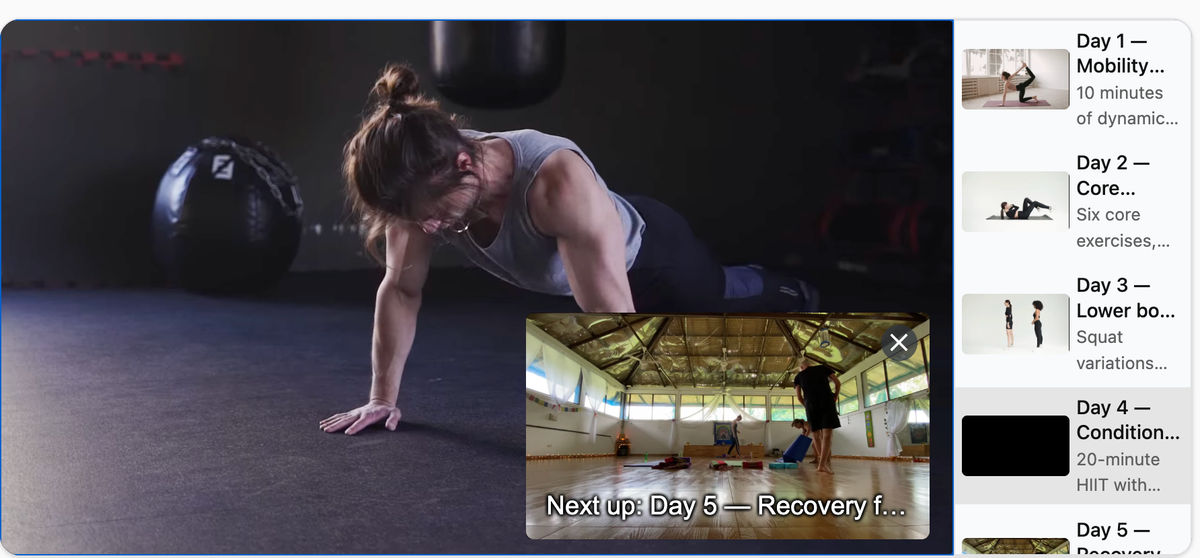
The info block on each source is what powers the playlist widget. Title and description render in the scrollable list and in the "next up" preview that appears before the current video ends.
Now wire the playlist into the player:
"use client";

import { IKVideoPlayer } from "@imagekit/video-player/react";
import "@imagekit/video-player/styles.css";
import { WORKOUTS } from "@/lib/workouts";

const ikOptions = {
  imagekitId: process.env.NEXT_PUBLIC_IMAGEKIT_ID!,
};

const playlist = {
  sources: WORKOUTS,
  options: {
    autoAdvance: 3,
    presentUpcoming: 10,
    widgetProps: {
      direction: "vertical" as const,
    },
  },
};

export default function SeriesPlayer() {
  return <IKVideoPlayer ikOptions={ikOptions} playlist={playlist} />;
}
That's the full playlist setup. The scrollable widget renders on the right side of the player, the first workout loads automatically, and each video advances to the next one after three seconds.
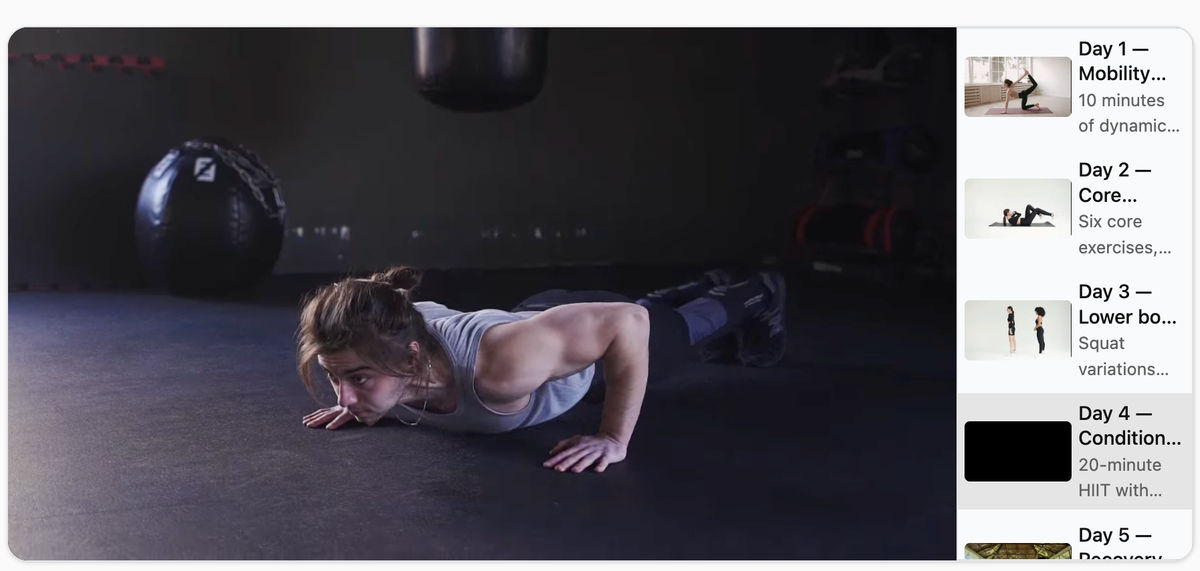
As the current workout nears its end, a "next up" preview surfaces the following video:
If you pass both source and playlist to IKVideoPlayer, playlist takes precedence and source is ignored. Pick one per player instance.
Choosing the right playlist options
Each option in playlist.options controls one aspect of playback flow. Here's the full set, with sensible defaults called out where they exist:
| Option | Purpose |
|---|---|
autoAdvance | Seconds to wait after a video ends before loading the next one. 0 advances immediately, false disables auto-advance entirely (viewers click to continue). Default: false. |
repeat | Loop the playlist back to the first video after the last one finishes. Useful for ambient or showcase reels. Default: false. |
presentUpcoming | Show a thumbnail preview of the next video before the current one ends. true uses a 10-second lead time, or pass a number for a custom value in seconds. Omit to disable the preview. |
widgetProps.direction | 'vertical' puts the playlist widget on the right side of the player; 'horizontal' puts it below. Vertical works well on desktop, horizontal reads better on mobile. Default: 'vertical'. |
A practical pattern: set autoAdvance: 3 for series content where viewers expect continuous playback, and autoAdvance: false for catalogs and libraries where viewers want to choose.
Surfacing recommendations after the series
Once the last video in a playlist finishes, the viewer either loops back (if repeat: true) or sits on the end frame. Neither is ideal if you have related content elsewhere on the site. The recommendations property on a source surfaces a set of suggested next videos when that video ends.
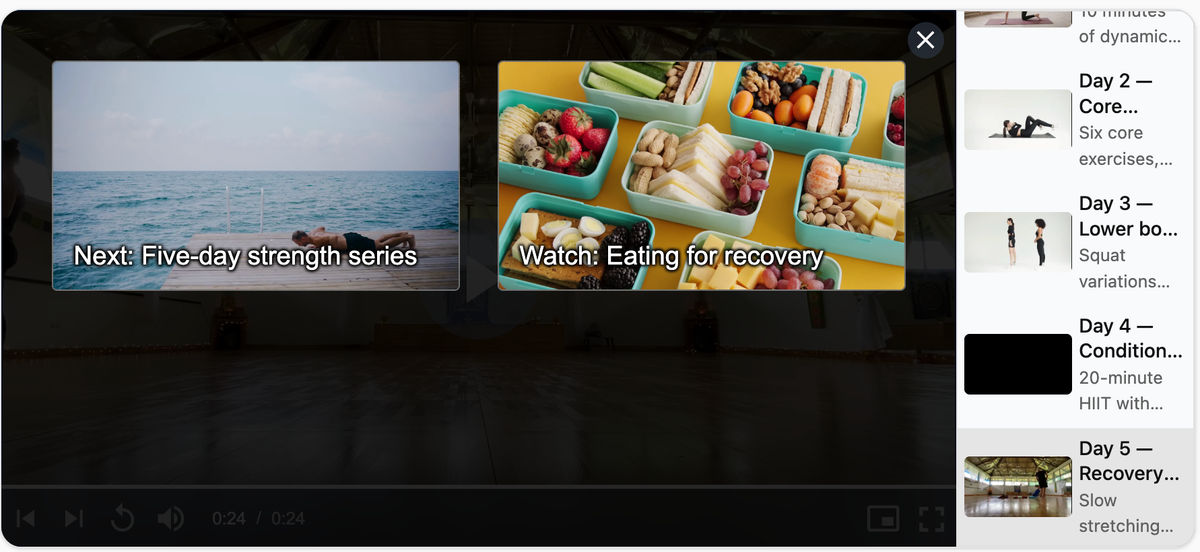
There's one important constraint to understand first: recommendations and auto-advance are mutually exclusive. When autoAdvance is enabled, the player automatically moves to the next video when one ends, so the recommendations pane never gets a chance to appear. Recommendations only render when autoAdvance is false. So to show recommendations after the series, set autoAdvance: false on the playlist and attach the recommendations to the final source:
// SeriesPlayer.tsx
const playlist = {
  sources: WORKOUTS,
  options: {
    autoAdvance: false, // required for recommendations to appear
    presentUpcoming: 10,
    widgetProps: {
      direction: "vertical" as const,
    },
  },
};
// lib/workouts.ts
export const WORKOUTS = [
// ... days 1-4 from above
{
src: "https://ik.imagekit.io/ikmedia/example_images/playlist-demo/day5.mp4",
info: {
title: "Day 5 — Recovery flow",
description: "Slow stretching and breathwork to close the week.",
},
recommendations: [
{
src: "https://ik.imagekit.io/ikmedia/example_images/playlist-demo/rec1.mp4",
info: { title: "Next: Five-day strength series" },
},
{
src: "https://ik.imagekit.io/ikmedia/example_images/playlist-demo/rec2.mp4",
info: { title: "Watch: Eating for recovery" },
},
],
},
];With auto-advance off, when the recovery video ends the player swaps the playlist widget for the recommendations pane. Clicking a recommendation loads that video and exits the playlist context.
Putting it together on a series page
The full series page is small. A page header with the series context, the player with the playlist wired in, and a footer with whatever else your site shows below.
// app/series/five-day-foundations/page.tsx
import SeriesPlayer from "@/components/SeriesPlayer";

export default function FiveDayFoundationsPage() {
  return (
    <main className="max-w-5xl mx-auto px-6 py-10">
      <header className="mb-8">
        <p className="text-sm uppercase tracking-widest text-zinc-500">
          Series · 5 workouts · 1 week
        </p>
        <h1 className="text-3xl font-semibold mt-1">
          Five-day foundations
        </h1>
        <p className="text-zinc-600 mt-2">
          A full week of short, focused workouts. No equipment required.
        </p>
      </header>

      <SeriesPlayer />
    </main>
  );
}
That's the whole tutorial. A series page with five queued videos, a next-up preview, per-video titles in the widget, and recommendations after the final video, all from one config object.
What we built
The page now does what would normally take a queue manager, a thumbnail strip with hover states, a next-up overlay, an auto-advance timer, and an end-of-series upsell view stitched together. Playlist state lives on the player. Per-video metadata renders in the widget automatically. The hand-off from one video to the next is handled by the SDK.
For the broader picture of what the Video Player SDK supports, the overview docs covers AI-generated subtitles and chapters, shoppable products, smart reframing, and floating playback, all configurable from the same source config you just used. The full reference for the playlist options used above lives in the playlist and recommendations guide.
If you're building richer video experiences on the same player, see How to add shoppable videos to your Next.js site with ImageKit for product overlays and clickable hotspots, or How to add AI subtitles and chapters to videos on your Next.js site with ImageKit for auto-generated captions and chapter markers.
Sign up for a free ImageKit account and try playlists on a series you already have.